
Home / Guides
Best Blender course for architectural visualisation (and how long it takes)
House walkthrough, interiors, or CAD drawings first? This guide compares my three Blender architecture courses by length, lectures and what you build, lists fair alternatives from other teachers, and gives a realistic timeline for getting comfortable.
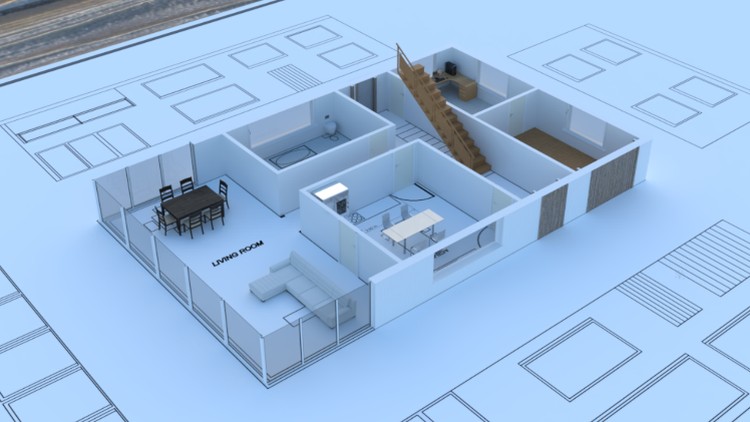
For house-scale archviz in Blender, pick a course that models a real house at real-world scale and ends with rendered images or a walkthrough. Architectural Design & Animation in Blender by Tom McDonald on Udemy does that in 8 hours over 121 lectures. Take the Interior course (13.5 hours) if you mainly need rooms, or FreeCAD & Blender (6 hours) if your drawings start in CAD.
Which Blender course fits your project?
Start from the picture you need at the end: a house walkthrough, interior stills, or CAD drawings rendered properly. Pick the row that matches it.
| If you need… | Course (Tom McDonald, Udemy) | Length | You finish with | Not for |
|---|---|---|---|---|
| A house modelled from a plan, plus a walkthrough or construction animation | Architectural Design & Animation in Blender | 8 hours, 121 lectures | A real-scale house with Archimesh doors, windows and stairs, lit and animated | Interior-only work, characters, games |
| Interiors (kitchen, living room, bedroom) | Interior 3D Modelling & Rendering – Blender 3D | 13.5 hours, 169 lectures | Furnished rooms, a dimensioned floor plan, an animation and a 360° panorama | Exterior-only house animation, game interiors |
| CAD drawings first, then a proper render | Architectural 3D Modeling & Rendering: FreeCAD & Blender | 6 hours, 76 lectures | A FreeCAD BIM house rendered in Blender | Archimesh-only house work with no CAD |
House + walkthrough
Architectural Design & Animation
From a DXF plan to a lit house, a construction animation and a Follow Path walkthrough · 8 hours.
Interiors
Interior 3D Modelling & Rendering
Kitchen, living room and bedroom, with materials, lighting, cameras and a panorama · 13.5 hours.
CAD first
FreeCAD & Blender
A BIM house in FreeCAD, exported as OBJ and finished in Blender · 6 hours.
What should you learn first for archviz in Blender?
Whichever course you pick, the work runs in the same order. These are the steps, with the free guides on this site that cover each one.
- Set real-world units. Work in metres (or feet) from the start, so doors, walls and furniture are true size and the camera behaves.
- Bring in the plan. Import a DXF from CAD, or model in FreeCAD and export. The FreeCAD to Blender guide covers export and units.
- Raise the walls and floors. Extrude from the plan and keep thicknesses consistent. The 3D cursor guide helps with placing things exactly.
- Add doors and windows. Archimesh does this inside Blender: see adding Archimesh doors and adding Archimesh windows.
- Dimension the plan. MeasureIt adds dimensions you can render with the floor plan.
- Materials and light. UV-map the main surfaces, add materials, then light the scene with an HDRI or a sun.
- Cameras. Set stills first, then a walkthrough. The walkthrough camera guide covers eye height, clipping and the camera path.
- Render, then finish one house. Render in Cycles, fix what looks wrong, and finish the whole house before starting a second project.
Architectural Design & Animation in Blender (house and walkthrough)
What you build
In Architectural Design & Animation in Blender by Tom McDonald on Udemy you build one house from the plan up. You set the unit scale, import a DXF plan, raise the walls from it, and add Archimesh doors, windows, stairs and railings. Then you set up HDRI lighting from an asset library, import and assign materials, and use booleans for a construction animation that shows the house going up. A Follow Path camera gives you the walkthrough, and you render in Cycles. A FreeCAD section covers drafting the plan and exporting the DXF.
Two free guides on this site come from the same workflow: adding Archimesh doors and adding Archimesh windows. The walkthrough camera guide covers eye height, clipping and the camera path.
Who it’s for, and who it’s not for
It’s for people who want to present a house design: architecture and design students, architectural technicians, and anyone coming from SketchUp or AutoCAD. No prior 3D experience is needed, and you need Blender 4 or newer. The Udemy page is plain about who it doesn’t suit: “Character animation, game assets, or interior-only visualization (that is the Interior course).”
Length
8 hours of video in 8 sections and 121 lectures. Last updated October 2026. Rated 4.6 from 1,199 ratings (Udemy, 19 October 2026).
Interior 3D Modelling & Rendering (rooms and stills)
What you build
You start with a 2D floor plan using Freestyle lines and MeasureIt dimensions, so the layout is right before anything goes 3D. Then you model a kitchen (with Archimesh cabinets), a living room and a bedroom, UV-map and texture them, light the interiors, and finish with camera animation, a 360° panorama for a browser tour, and an exterior shot.
Who it’s for, and who it’s not for
Interior designers and anyone who mainly needs rooms rather than whole buildings. No prior 3D experience is needed. Its “not for” line on Udemy: “Exterior-only house animation (Architectural Design & Animation) or game interiors.”
Length
13.5 hours of video in 11 sections and 169 lectures. Last updated October 2026. Rated 4.6 from 772 ratings (Udemy, 19 October 2026).
FreeCAD & Blender (CAD first, then render)
What you build
You model the house as a FreeCAD BIM model, including the stairs, and export it as OBJ. In Blender you set the scene scale, bring in the surroundings with Blosm, set up a material library, UV-map the walls and roof (with a short Python section that automates part of the UV work), then light it with Dynamic Sky, Sun Position and an HDRI and render in Cycles.
One section of the FreeCAD course uses Twinmotion, which is separate software. The free guide FreeCAD to Blender: export, units, then render covers the handoff step.
Who it’s for, and who it’s not for
People who think in drawings first. The Udemy description says it’s “Useful if you are leaving AutoCAD, Revit, or SketchUp and want a free path.” No prior 3D experience is needed. Its “not for” line: “Archimesh-only house work with no CAD (that is Architectural Design & Animation).”
Length
6 hours of video in 12 sections and 76 lectures. Last updated June 2026. Rated 4.5 from 219 ratings (Udemy, 19 October 2026).
What are the other good Blender archviz courses?
My courses aren’t the only route. These come up most often when people ask the same question. Format and length are as each provider published them on 19 October 2026.
| Option | Format | Length (as published) | Pick it if |
|---|---|---|---|
| learn-blender.org, Blender for Architecture & ArchViz | Own platform; enrolment by waitlist | 8h 50m, 30+ video lessons | You want interior and exterior with personal feedback, and can wait for enrolment to open |
| Alex Cordebard, The Ultimate Blender 3D Architecture Course | Udemy | 15h 50m, 85 lectures | You want lots of furniture and interior modelling |
| Edward Harding, Learn Architectural Design & Animation With Blender | Udemy | About 20 hours | You want a long, project-based course |
| UH Studio Academy, Blender Architecture Masterclass | Own site | 4+ hours, 12 chapters | You work on commercial massing and Geometry Nodes |
| Camille Boldt, interior archviz course | Domestika | 2h 32m, 15 lessons | You want a short interior course |
| Aureus Studio, architectural design with Blender | Domestika | 3h 28m, 20 lessons | You already know the basics and want a short course |
| Blender 3D Architect, Blender for Architects (free course) | YouTube, free | About 3.5 hours | You want to try Blender for architecture before paying for anything |
How long does it take to learn Blender for architecture?
The course video is 6 to 13.5 hours, depending on which one you take. Being comfortable takes longer than that, because you need to finish a few scenes on your own. CADA’s guide to learning Blender puts the first stage (simple models, materials, lighting and a rendered still) at 4 to 8 weeks with 5 to 10 hours of practice a week. Planning and finishing your own projects without a tutorial takes 6 to 12 months at 10 to 15 hours a week.
| Stage | Time | Source |
|---|---|---|
| Watch and follow one of my architecture courses | 6 to 13.5 hours of video | Udemy course pages, 19 October 2026 |
| Comfortable: simple models, materials, lighting, a rendered still | 4 to 8 weeks at 5 to 10 hours a week | CADA, cada-edu.com, “How long does it take to learn Blender” |
| Planning and finishing your own projects | 6 to 12 months at 10 to 15 hours a week | Same CADA guide |
My own advice: finish one complete house before you start a second course. One finished house teaches you more than three half-watched ones.
Is Blender good for architectural visualisation?
Where it’s strong
Presenting a design. Blender is free, it models at real-world scale, and it gives you interior stills, exterior renders and walkthrough animation from the same file. Add-ons like Archimesh and MeasureIt cover doors, windows and dimensions.
Where it’s not the right tool
Construction documentation, schedules and BIM production. Those stay in CAD or BIM software. Blender won’t replace your drawing package, and you shouldn’t try to make it.
A sensible split
Draft in CAD or FreeCAD, present in Blender. That is the route in Architectural 3D Modeling & Rendering: FreeCAD & Blender, and the free FreeCAD to Blender guide shows the export step.
Can Blender make house plans?
It can make presentation plans: an orthographic top view with Freestyle lines and MeasureIt dimensions, which the Interior course covers. For construction drawings with schedules and revisions, use CAD or BIM software and bring the model into Blender to present it.
FAQ
Frequently asked questions
What’s the best Blender course for architectural visualisation?
The one that matches the image you need at the end. For a house modelled from a plan and shown in a walkthrough, Architectural Design & Animation in Blender by Tom McDonald on Udemy covers plan import, Archimesh doors and windows, lighting and a construction animation in 8 hours over 121 lectures. For interiors, the Interior 3D Modelling & Rendering course runs 13.5 hours over 169 lectures.
Is there a Blender course that covers a house walkthrough animation?
Yes. Architectural Design & Animation in Blender by Tom McDonald on Udemy (8 hours, 121 lectures) includes a Follow Path walkthrough camera and a construction animation.
Which course covers interiors?
Interior 3D Modelling & Rendering – Blender 3D (13.5 hours, 169 lectures): a kitchen, living room and bedroom, with stills, an animation and a 360° panorama.
I use AutoCAD, Revit or SketchUp. Which course should I take?
The FreeCAD & Blender course. Its Udemy description says it’s “Useful if you are leaving AutoCAD, Revit, or SketchUp and want a free path.”
Do I need 3D experience?
No. Each of the three courses says no prior 3D experience is required.
Is Blender free? Do I need paid software?
Blender is free from blender.org, and FreeCAD is free too. One section of the FreeCAD course uses Twinmotion, which is separate software.
Which version of Blender do I need?
Architectural Design & Animation requires Blender 4 or newer, according to its Udemy requirements.
How long does it take to learn Blender for architecture?
My architecture courses run 6 to 13.5 hours of video. CADA’s guide puts basic comfort at 4 to 8 weeks with 5 to 10 hours of practice a week, and working on your own projects at 6 to 12 months with 10 to 15 hours a week.
Is Blender worth it for architectural technicians?
Yes, for presenting designs: real-scale models, interior stills and walkthrough animation, with no licence cost. It doesn’t replace CAD or BIM for construction drawings and schedules, so many people draft in CAD or FreeCAD and present in Blender.
Why do the links go to Udemy?
The courses are hosted on Udemy, and the links on this page are my instructor links. All the courses are also listed on the courses page, and there’s more about me on the about page.
Start here
Pick the course that matches the picture you need
- House + walkthrough: you want a house from a plan, lit and animated.
- Interiors: you mainly need kitchens, living rooms and bedrooms.
- CAD first: your drawings start in CAD and you want them rendered properly.
Free files and shortcut PDFs that go with the courses are on the assets page, and the free videos are on the tutorials page.
