
Home / Blender Blocks
Blender Blocks: a floor plan and layout asset library for Blender
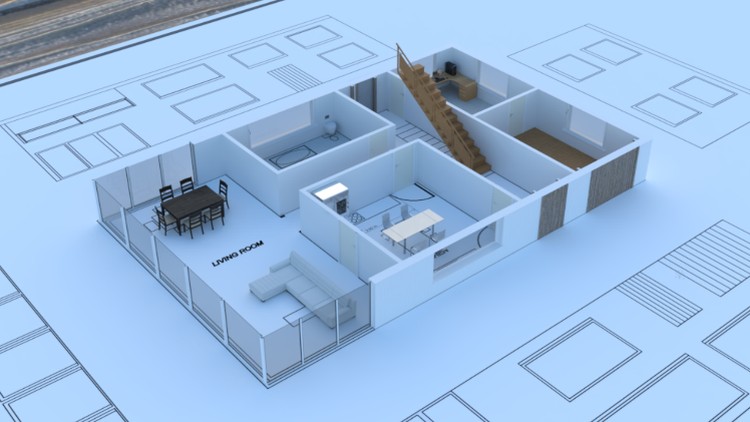
Blender Blocks is a paid asset library: a set of ready-made blocks for laying out floor plans, rooms and furniture in Blender. You add it to Blender’s Asset Library, drag pieces into your scene, arrange the layout, and then build the detailed model on top. It’s for the early design stage, before full 3D modelling.

What it’s for
What is Blender Blocks used for?
When you design a space, the layout comes first. Floor plans, room proportions and how people move through the rooms set up everything after them: materials, budget and the final model. Blender Blocks gives you a quick way to test layouts and try options inside Blender, and to go from a clear 2D plan to 3D without leaving the program.
Once the layout works, keep it as the base and model the detail on top. The guide to learning Blender for architectural visualisation covers that next stage.
Why use it?
- Drag and drop: place pieces straight into the scene to try a layout.
- Consistent and reusable: the same blocks across projects keep plans consistent.
- Inside Blender: works from Blender’s own Asset Library, no extra program.
- Made for planning: lay out floor plans, furniture and rooms.
- Saves time early: settle the layout before full 3D modelling.
Who it’s for
Who is Blender Blocks for?
How it works
How do I install and use Blender Blocks?
- Download and install. Buy it on Gumroad and download the files and add the folder to Blender’s Asset Library (Edit › Preferences › File Paths › Asset Libraries).
- Drag and drop. Open the Asset Browser and drag blocks into your project.
- Adjust and arrange. Move, rotate and resize the pieces until the layout works.
- Build on it. Use the layout as the base, then refine it in full 3D.
Next step
Turn the layout into a finished house
Blender Blocks gets the plan right. To model the house properly, with doors, windows, materials and a walkthrough, these are the next steps on this site.
Full course
Architectural Design & Animation in Blender
Model a house from a floor plan at real-world scale, add Archimesh doors and windows, then animate a walkthrough · 8 hours of video.
FAQ
Questions about Blender Blocks
Is Blender Blocks free or paid?
Blender Blocks is a paid product, not a free download. It’s sold on Gumroad, and the current price and licence are shown on the Gumroad page.
How do I add Blender Blocks to the Asset Library?
Unzip the download, then in Blender go to Edit › Preferences › File Paths › Asset Libraries, add the folder, and open the Asset Browser. The setup video shows each step.
Does Blender Blocks replace CAD drawings?
No. It’s for early layout and blocking out rooms. For dimensioned drawings, add MeasureIt dimensions in Blender or draw the plan in CAD.
What do I do after the layout?
Model the house on top of it. The archviz course guide compares the three architecture courses, and the free tutorials cover Archimesh, MeasureIt and cameras.
